

WORKSHOP FOR PARENTS: HOW CHILDREN LEARN TO CODE?
Have you ever stepped into the shoes of a child to experience a new subject? If not, the "How children learn to code" workshop will offer you a unique perspective! […]



Game development is now a subject of great interest for many parents. It not only helps children avoid game addiction and limit their gaming time but also allows them to develop technological skills and other cognitive abilities. Design and game development enable children to unleash their creativity while honing their critical thinking skills. There are numerous game development software and tool options available for kids. Algorithmics introduces some basic and user-friendly tools to make games for children.
Instead of spending time playing games, why not encourage your child to try their hands at game development? It's a fantastic way for them to explore and develop their thinking and skills.
When your child makes games, they will immerse themselves in the process of creating their own unique games. From building challenging gameplay to designing characters and crafting storylines, they'll learn how to think logically and find solutions to issues that arise during game development. This not only hones problem-solving skills but also helps them develop patience and perseverance in perfecting their creations.
Moreover, game development encourages your child to be mindful of the user experience. Creating a game requires understanding and meeting the needs of players. This fosters empathy and understanding of others, which is a crucial skill in the modern world.
nstead of spending time playing games, why not encourage your child to try their hands at game development? It's a fantastic way for them to explore and develop their thinking and skills.
When your child makes games, they will immerse themselves in the process of creating their own unique games. From building challenging gameplay to designing characters and crafting storylines, they'll learn how to think logically and find solutions to issues that arise during game development. This not only hones problem-solving skills but also helps them develop patience and perseverance in perfecting their creations.
Moreover, game development encourages your child to be mindful of the user experience. Creating a game requires understanding and meeting the needs of players. This fosters empathy and understanding of others, which is a crucial skill in the modern world.
Instead of merely consuming products made by others, game development allows your child to be part of the process of content creation and self-expression. This not only fuels their creativity but also opens doors for them to explore and experiment with new ideas.
One of the most popular tools
Instead of merely consuming products made by others, game development allows your child to be part of the process of content creation and self-expression. This not only fuels their creativity but also opens doors for them to explore and experiment with new ideas.
One of the most popular tools to make games for kids is Scratch. With an intuitive graphical interface, Scratch allows kids to create games by dragging and dropping code blocks. This helps them quickly get familiar with programming concepts and create simple games.

Developed by MIT Media Lab.
Programming language used: Block-based programming language.
Age range: Suitable for 5-year-olds and up.
Pros:
Cons:
G-Develop is a powerful and user-friendly game design platform that allows users to create games simply and quickly. With G-Develop tool, kids don't need to have complex programming knowledge. They can use the intuitive interface and drag-and-drop features to create unique and engaging games.

Developed by Florian Rival and iPower.
Programming languages used: Graphic programming language, JavaScript.
Age range: Suitable for 10-year-olds and up.
Pros:
Cons:
Tinkercad is a popular online 3D design platform. It is an intuitive 3D design and modeling platform widely used in education and programming communities. With a simple and user-friendly interface, Tinkercad allows users to create 3D models and program their actions and interactions.

Developed by Autodesk, a technology company.
Programming languages used: Does not use programming languages.
Age range: Suitable for 8-year-olds and up.
Pros:
Cons:
With Roblox, kids can create, share, and experience thousands of different interactive games. Additionally, Roblox has a thriving development community where independent developers can be creative and share ideas. Roblox provides users with a safe and diverse environment to explore, create, and socially interact in the virtual world.

Software developed by Roblox Corporation.
Programming language used: Lua.
Age range: Suitable for 9-year-olds and up.
Cons:

Unity is a powerful cross-platform game development that allows the creation of diverse 2D and 3D games on multiple operating systems and devices. With rich tools and features, Unity enables users to develop high-quality games, supports the integration of external resources, and has a large development community. Whether you are a beginner or an expert, Unity is an excellent choice for game development.
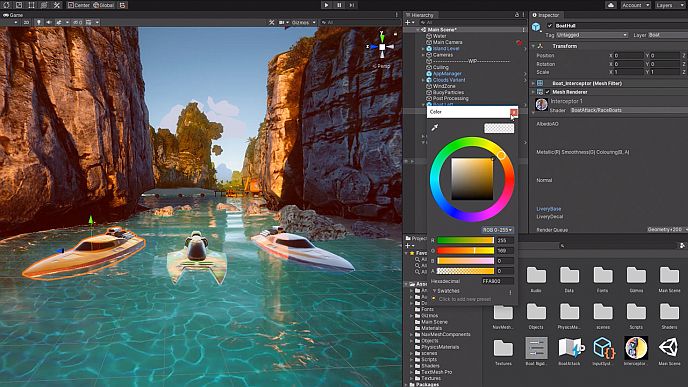
Software developed by Unity Technologies.
Programming language used: C#.
Age range: Suitable for 12-year-olds and up.
Pros:
Cons:
GameMaker Studio is a powerful and user-friendly game development platform. Children can create diverse 2D games quickly and easily without requiring deep programming knowledge. This platform provides an intuitive interface and drag-and-drop tools to design environments, characters, and game mechanics. With multi-platform publishing capabilities, GameMaker Studio allows you to deploy your games on various operating systems and devices.

Software developed by YoYo Games.
Programming language used: GML (GameMaker Language).
Age range: Suitable for 10-year-olds and up.
Pros:
Cons:
Stencyl is a powerful and user-friendly 2D game development platform based on block programming. With its intuitive interface and drag-and-drop tools, children can easily create unique 2D games. They can build game logic and functions by selecting and arranging programming blocks. With Stencyl, you can unleash your creativity and easily create your own distinctive 2D games.
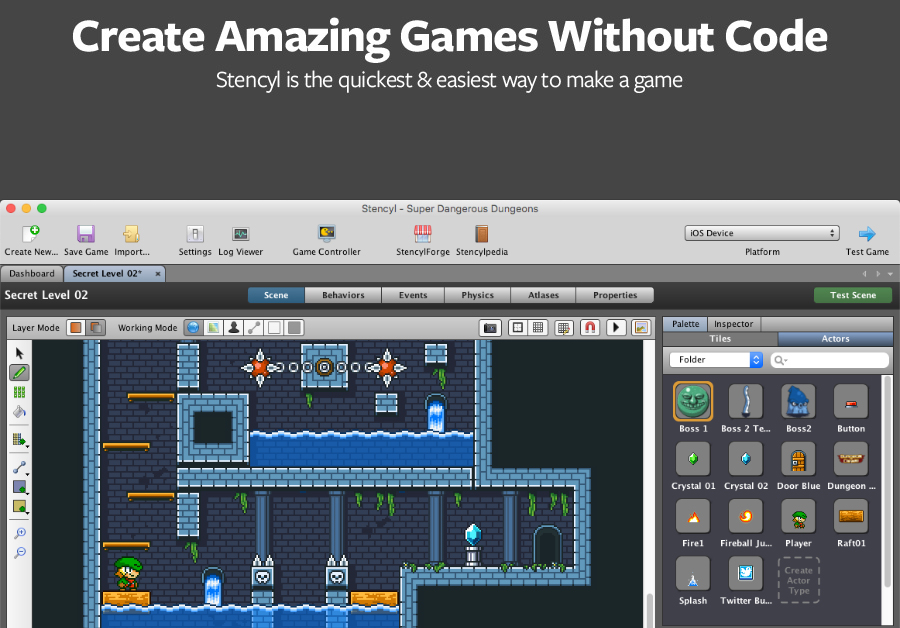
Developed by Stencyl LLC.
Programming Language: Stencyl's Drag-and-Drop
Age Range: 8 years old and above
Pros:
Cons:
KTurtle is a platform that helps children learn programming through drawing images. With a simple and user-friendly interface, KTurtle allows children to explore and practice programming creatively. Children can draw simple images and control them by using basic programming commands. Learning programming through KTurtle helps children develop logical thinking, object-oriented thinking, and problem-solving skills.

Software developed by: KDE
Programming language used: Turtle Script
Age group: 8 years old
Pros:
Cons:
Code Monster is a programming learning platform designed for children to explore and interact directly with code. With a simple and engaging interface, Code Monster helps children develop logical thinking and creativity in programming.

Software developed by: University of Washington
Programming language used: JavaScript
Age group: 9 years old
Pros:
Cons:
Learning game programming helps children develop technological skills and creative thinking. It not only enables them to become creators of unique games but also fosters the development of various other skills. However, parents and educators need to choose suitable software that aligns with the child's abilities and interests to optimize the learning process and enhance programming skills. Learning game programming not only provides an enjoyable experience for children but also builds a strong foundation for their future.
To assess the child's abilities and technological skills, as well as finding the right programming language, parents can participate in a free evaluation session at HERE. From there, they can determine whether their child is suitable for this field or not.
Have you ever stepped into the shoes of a child to experience a new subject? If not, the "How children learn to code" workshop will offer you a unique perspective! […]
Are you seeking a course that can help your child explore their potential? Do you want your child to enhance their soft skills? The "Workshop: Coding - new but powerful […]
Cuối cùng, giải đấu Coder of Legends đã tìm được những thí sinh xuất sắc nhất Algorithmics. Cùng Algo điểm qua 12 dự án đạt giải khuyến khích, 9 dự […]